Per-Environment Cohorts for Group Flags
Welcome to the new Per-Environment Cohorts feature! This guide walks you through the enhancements we’ve made to Group Flags, allowing you to manage user access across different environments with unprecedented flexibility and safety.
What’s New?
Previously, cohort settings (lists of user IDs, emails, etc.) for a Group Flag were global. If you added testers to a flag, those same testers were evaluated across Development, Staging, and Production.
Now, you can define distinct cohorts for every single environment your flag is deployed to!
🎯 True Environment Isolation
You no longer need to share the same list of user IDs across Dev, Staging, and Production. If your internal test users have different IDs in different environments, you can configure them independently.
- Scenario: Your development database uses simple auto-incremented IDs (
user_1,user_2), but your production database uses UUIDs. You can now enable thedevenvironment foruser_1and theprodenvironment for a specific UUID without conflicts.
🛠️ Effortless Overrides
Environment-specific cohorts act as an override. If you add a cohort to an environment, the system strictly looks at that environment’s cohort list and ignores the global flag-level settings for that specific environment.
- Benefit: Have a global set of beta testers defined on a flag level? By adding an environment-specific cohort to your
devenvironment, you instantly override the global list locally, ensuring your staging and production settings remain safe and untouched.
🛡️ Smart Fallbacks
What happens if you don’t define a cohort for a specific environment? The system intelligently falls back to using the global flag-level cohorts.
- Benefit: Complete backward compatibility! All your existing flags will continue to function exactly as they did before without requiring any configuration changes from you.
👀 At-a-Glance UI Badges
We’ve redesigned the Group Flags table to provide immediate visibility into your flag configurations.
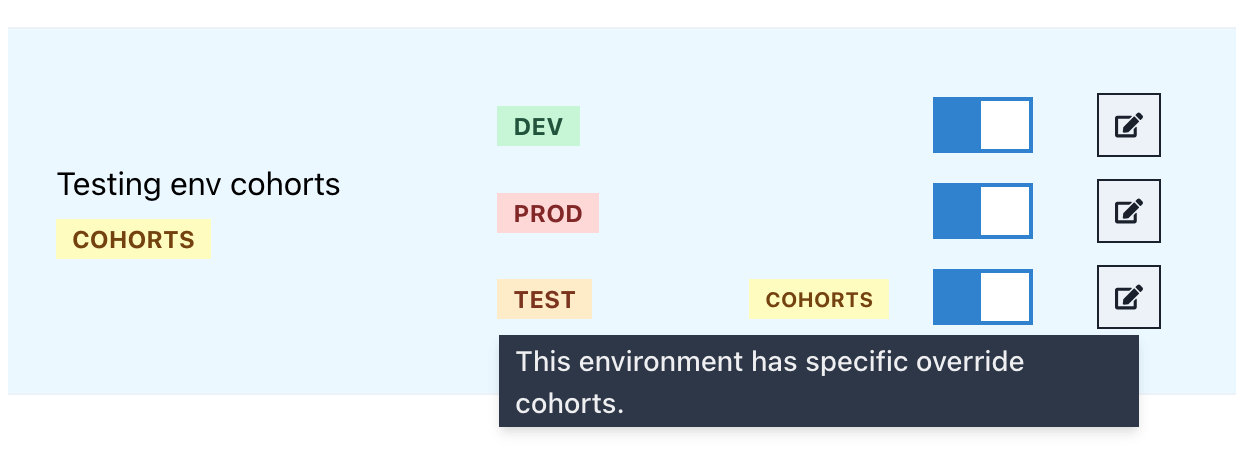
- UI Update: You don’t have to guess or click into every environment’s settings. A brand new, highly visible “Cohorts” badge appears directly next to the environment name in the table whenever that environment is utilizing its own specific cohort override.
⚡ Zero Performance Impact
We understand that evaluation latency is critical.
- Performance: This feature was engineered specifically to piggyback on existing evaluation mechanisms. Checking for an environment override involves a single array length check (which takes a fraction of a nanosecond), ensuring zero noticeable performance impact or latency to the API endpoints.
How to Use It
- Navigate to the Group Flags table in your project.
- Find the flag you want to configure and click the pencil icon next to the specific environment toggle (e.g.,
devorprod).
- In the “Update Environment” modal, you will see a new Environment Cohorts text area.
- Enter a comma-separated list of identifiers (like emails or user IDs).
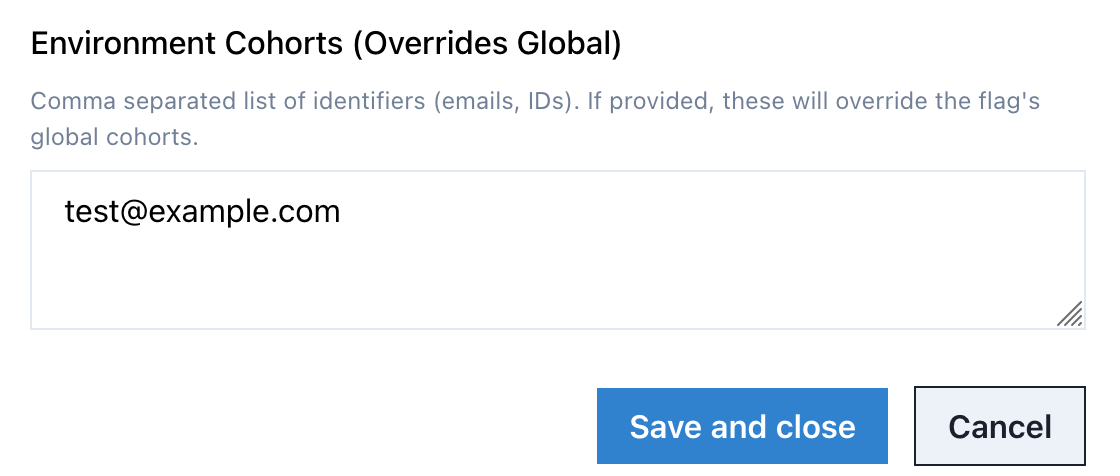
- Click Save. You’ll instantly see the yellow “Cohorts” badge appear next to that environment in the main table!
Happy flagging!